About Background video recorder
Start recording with simple, convenient controls and continue capturing video while using other apps. A persistent Android notification displays the recording status and provides quick access to essential controls....
Start recording with simple, convenient controls and continue capturing video while using other apps. A persistent Android notification displays the recording status and provides quick access to essential controls.
Background Video Recorder is a versatile video-recording app designed for personal documentation and other lawful purposes.
📹 HIGH-QUALITY VIDEO RECORDING
Capture videos using your device’s front or rear camera. Depending on your camera hardware, you can choose from supported resolutions such as:
- 4K
- 1080p
- 720p
- 480p
Available resolutions, frame rates, and camera settings vary by device.
⏱️ LONG RECORDING SESSIONS
Long Recording Mode divides extended recording sessions into manageable video files. When one segment reaches its configured duration, the app can continue the session in a new file.
Recording duration depends on available storage, battery level, device temperature, Android restrictions, and camera hardware.
You can also add an optional date and time stamp to your recordings.
▶️ CONVENIENT RECORDING CONTROLS
After completing the required setup and granting permissions, you can control recording through supported methods such as:
- Controls inside the app
- Ongoing recording notification
- Home-screen shortcuts
- Volume-button actions
- Power-button actions
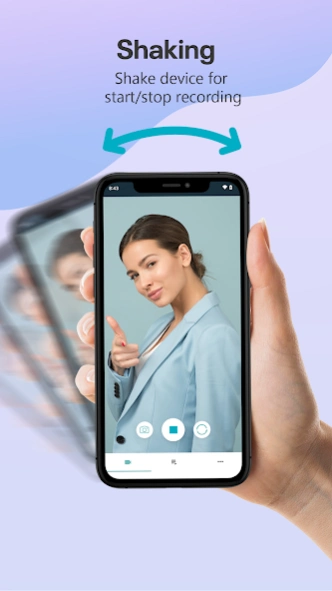
- Shake gestures
- Scheduled recording
- Supported Google Assistant commands
Feature availability may vary depending on your device manufacturer, Android version, permissions, and battery settings.
📅 SCHEDULED RECORDING
Choose a date and time for a recording session. Android background-start restrictions, battery optimization, permissions, or manufacturer settings may affect scheduled recording on some devices.
🤖 OPTIONAL SMART DETECTION
On supported devices, optional on-device detection can respond to events such as a visible human face.
Smart detection must be enabled by the user and requires camera access. Its availability and accuracy depend on lighting, camera position, device performance, and environmental conditions.
☁️ LOCAL STORAGE AND OPTIONAL CLOUD BACKUP
Recordings are saved locally on your device by default. Your videos are not automatically uploaded to our servers.
You can choose to transfer or back up selected recordings to supported third-party services such as Google Drive or Dropbox. Cloud transfers occur only after you connect the relevant service and initiate the action.
🔒 PRIVACY AND APP PROTECTION
Background Video Recorder may request the following permissions:
- Camera access to capture video
- Microphone access when audio recording is enabled
- Notification access to display recording status and controls
- Location access only when optional geotagging is enabled
- Storage or media access when needed to save and manage recordings
Password protection can help prevent unauthorized access to the app.
Background Video Recorder does not hide an active recording from the device owner. Always respect the privacy of others and comply with applicable consent, privacy, and recording laws. Obtain permission before recording another person or a private location.
❤️ ADDITIONAL FEATURES
- Front and rear camera support
- Optional camera preview
- Camera white-balance controls
- Optional camera shutter sounds where supported
- Date and time stamps
- Video trimming tools
- Password protection
- Multiple-language support
- Optional location metadata
- Local recording management
- Google Drive and Dropbox support
- Recording-status notification
Location tagging is optional and requires location permission. Your gallery or media application may use stored location metadata when displaying a recording.
Download Background Video Recorder and capture important moments with flexible controls designed for everyday recording.
Questions, feedback, or feature requests?
Contact: getnahid2@gmail.com
Previous Versions
Here you can find the changelog of Background video recorder since it was posted on our website on 2019-07-16 16:26:37.
The latest version is 6.0.5 and it was updated on 2026-10-10 22:36:09. See below the changes in each version.
Background video recorder version 6.0.5
Updated At: 2026-10-04
Changes: What's new in 6.0.5:
• Fixed duplicate recordings appearing in your list
• Fixed the Stop button sometimes not stopping a recording
• Fixed the preview covering the screen and blocking settings
• Several crash fixes for better stability
• Performance improvements
Background video recorder version 6.0.4
Updated At: 2026-09-24
Changes: • New Video Editor — trim recordings to just the part you need; pick a quality preset or fine-tune resolution, frame rate, bitrate and audio, then export.
• Recover unplayable recordings — rebuild interrupted captures, and clear out empty or damaged files in one place.
• Your recordings now survive an uninstall and reinstall.
• Files & Cloud — real video thumbnails, clip durations, and Today / Yesterday grouping.
• Faster editor, plus crash and stability fixes.
Background video recorder version 6.0.2
Updated At: 2026-09-15
Changes: • New Video Editor — trim recordings, choose a quality preset or adjust resolution, frame rate, bitrate, and audio before exporting.
• Recover interrupted or unplayable recordings and remove empty or damaged files.
• Recordings now remain available after reinstalling the app.
• Files & Cloud now shows thumbnails, durations, and Today/Yesterday groups.
• Faster editing, crash fixes, and stability improvements.
Background video recorder version 5.0.8
Updated At: 2026-07-03
Changes: • Resolved the 4K recording issue
• Enjoy true 4K video quality when 4K mode is selected
• Fixed minor bugs and improved stability
Background video recorder version 5.0.7
Updated At: 2025-12-22
Changes: Google Drive & Dropbox integration – upload your recorded videos directly to the cloud.
Background video recorder version 4.0.2
Updated At: 2025-08-05
Changes: Fixed some errors
Background video recorder version 2.3.4
Updated At: 2024-09-29
Background video recorder version 2.3.3.3
Updated At: 2024-01-02
Changes: * Now the user can record video for a long time using the long video recording mode. It will adjust the camera settings for longer video recording. The quality of the recorded videos will be poor.
* Displays the date and time stamp on the video.
Background video recorder version 2.2.4.3
Updated At: 2022-05-03
Changes: Use voice command to start or stop video recording
Background video recorder version 2.2.3.1
Updated At: 2022-02-10
Changes: Fix volume key issue on Android 12